MALWARE-HUNTING
Malware almost always "phones home" to its Command and Control (C2) servers. These communications are often at regular intervals called "beacons". However, detecting and blocking beaconing traffic can be challenging for cybersecurity professionals, as many legitimate applications also use beacons for benign purposes. Let's explore beacons in depth so we can understand their nuances and find more malware in our environments.
 By Ryan Victory
Mar 3rd, 2023 · 6 minute read
Art via DALL-E
Malware beaconing is a technique used by cybercriminals to establish a connection with a Command and Control (C2) server and maintain ongoing communication. This often involves the malware sending out periodic signals or “beacons” to the C2 server at fixed or sporadic (random) intervals, allowing the attacker to maintain control over the infected device while trying to avoid being detected. Beaconing is a critical component of malware and is often used to maintain long-term access to malware on targeted networks.
Beacons refer to any communication on a network that happens at a regular interval. That interval can be fixed or sporadic. Software (and malware) applications can use beacons to provide updates to external services or to receive new information or instructions.
To help us better classify activity as “beacon-like”, we can use a set of rough requirements:
Beacons can occur at fixed intervals (such as every 60 seconds) or they can be completely random. Sometimes a “jitter” value is also added to the beacon interval to confuse attempts to identify the beacon activity. Jitter is a random amount of time variance added to the beacon interval to make it harder to detect the beacon activity. Legitimate applications don’t have much incentive to introduce jitter, but malicious ones do.
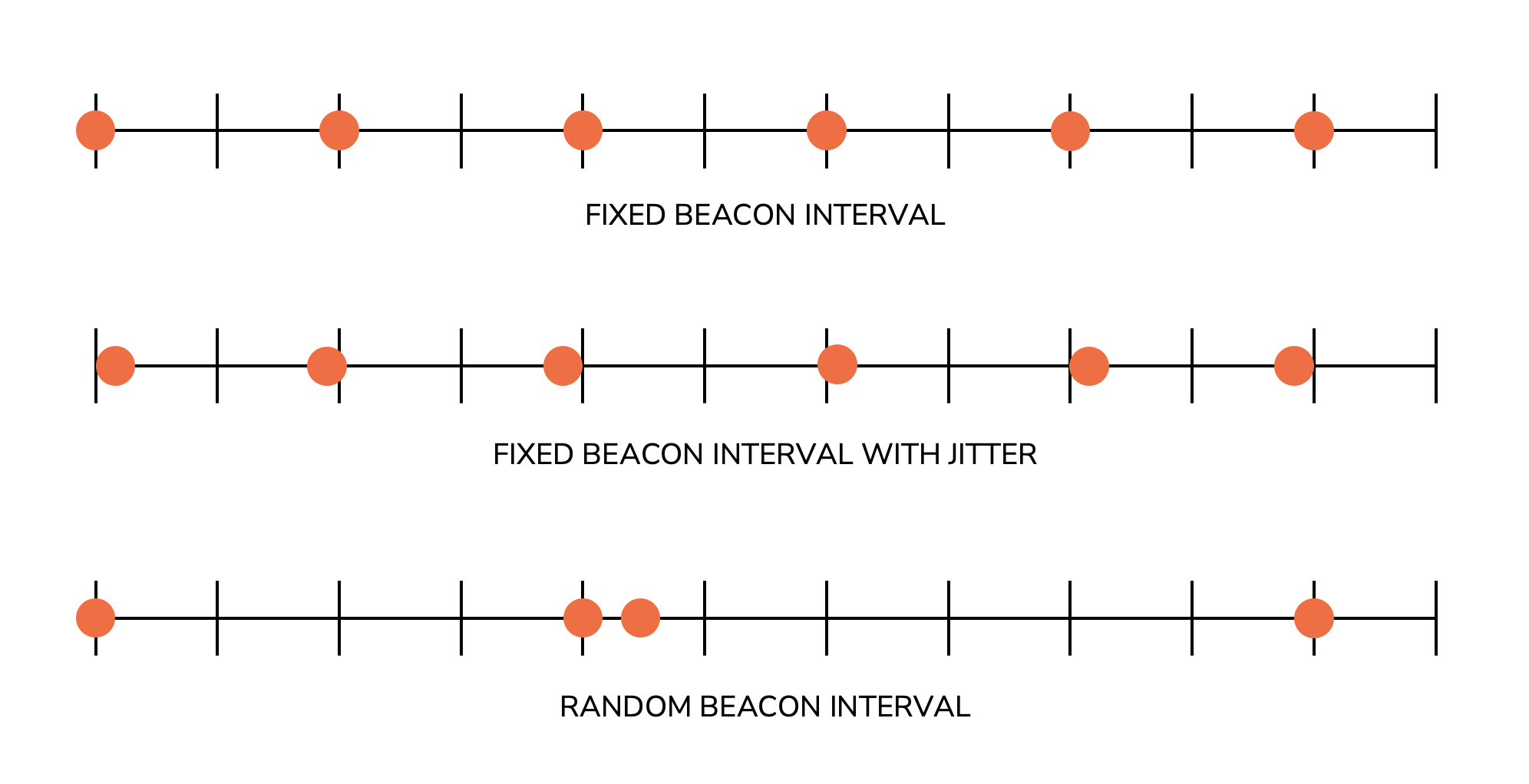
Completely random beacon intervals come with tradeoffs for the malware (or software) author: they may be harder to detect, but they are unpredictable. If the malware needs fast execution of its instructions, random beacons may not be appropriate. Jitter allows the malware author to blend the anti-detection properties of random beacons with the “regularity” of fixed beacons. We can break a beacon with jitter down into a few parts:
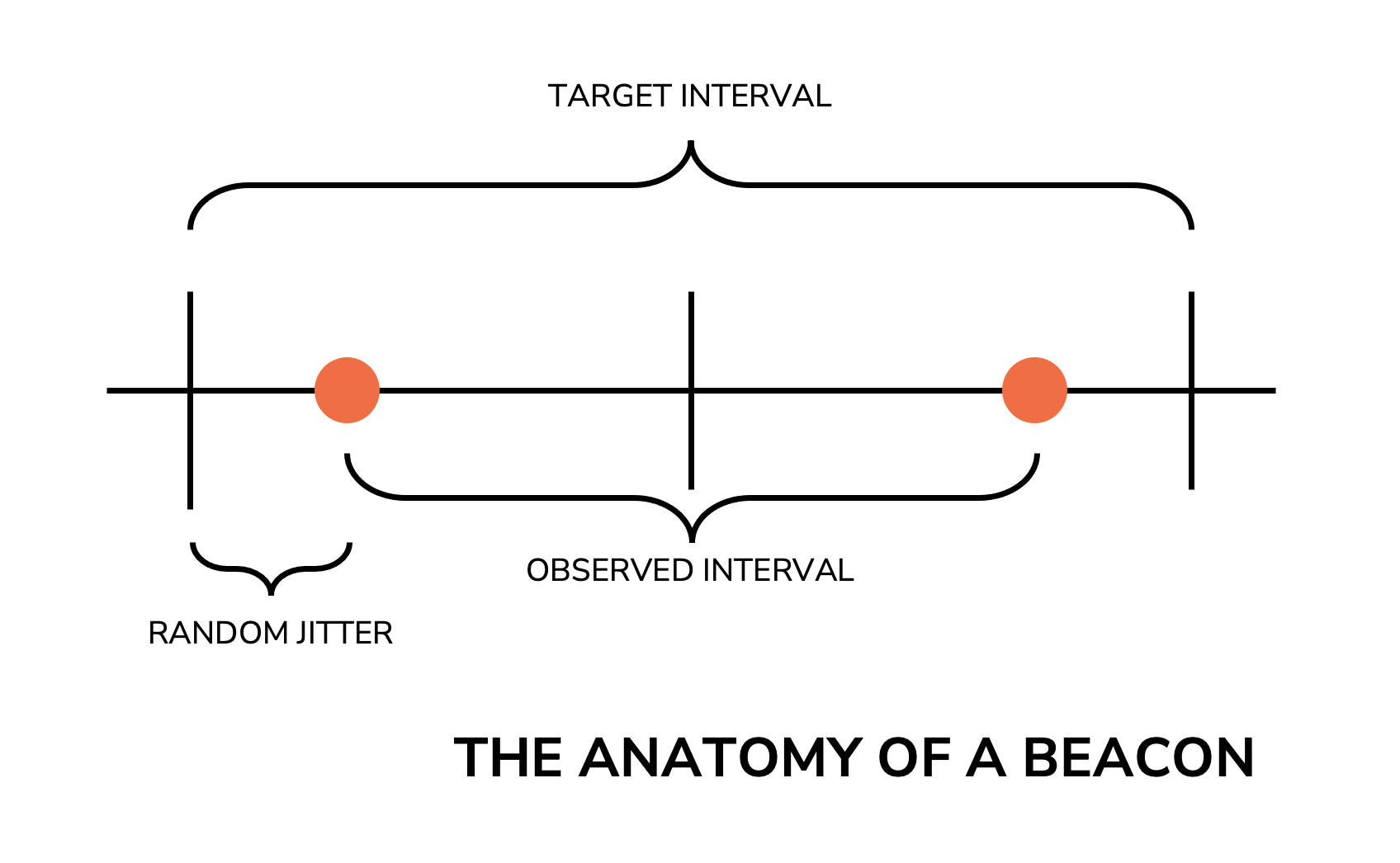
The Target Interval is how often, on average, the beacons should occur. This is a fixed number, such as “60 seconds.” The Random Jitter is a value that is added or subtracted from the beacon interval to add randomness to the beacons. The Observed Interval is the actual interval between a pair of beacons, after the jitter is applied. As defenders, we only ever witness the observed interval since the other values are only known to the application generating the beacons.
Unfortunately, beacons aren’t unique to malware. Software of all types use beacons to perform “normal” and otherwise benign functions, such as:
Web pages are a very common source of (benign) beacon activity. Many web pages use asynchronous JavaScript requests to retrieve
information, often at regular intervals (often by scheduling these requests using JavaScript’s setInterval function).
For example, let’s examine the network traffic generated by visiting a popular news website and letting the page sit
idle for a few minutes:
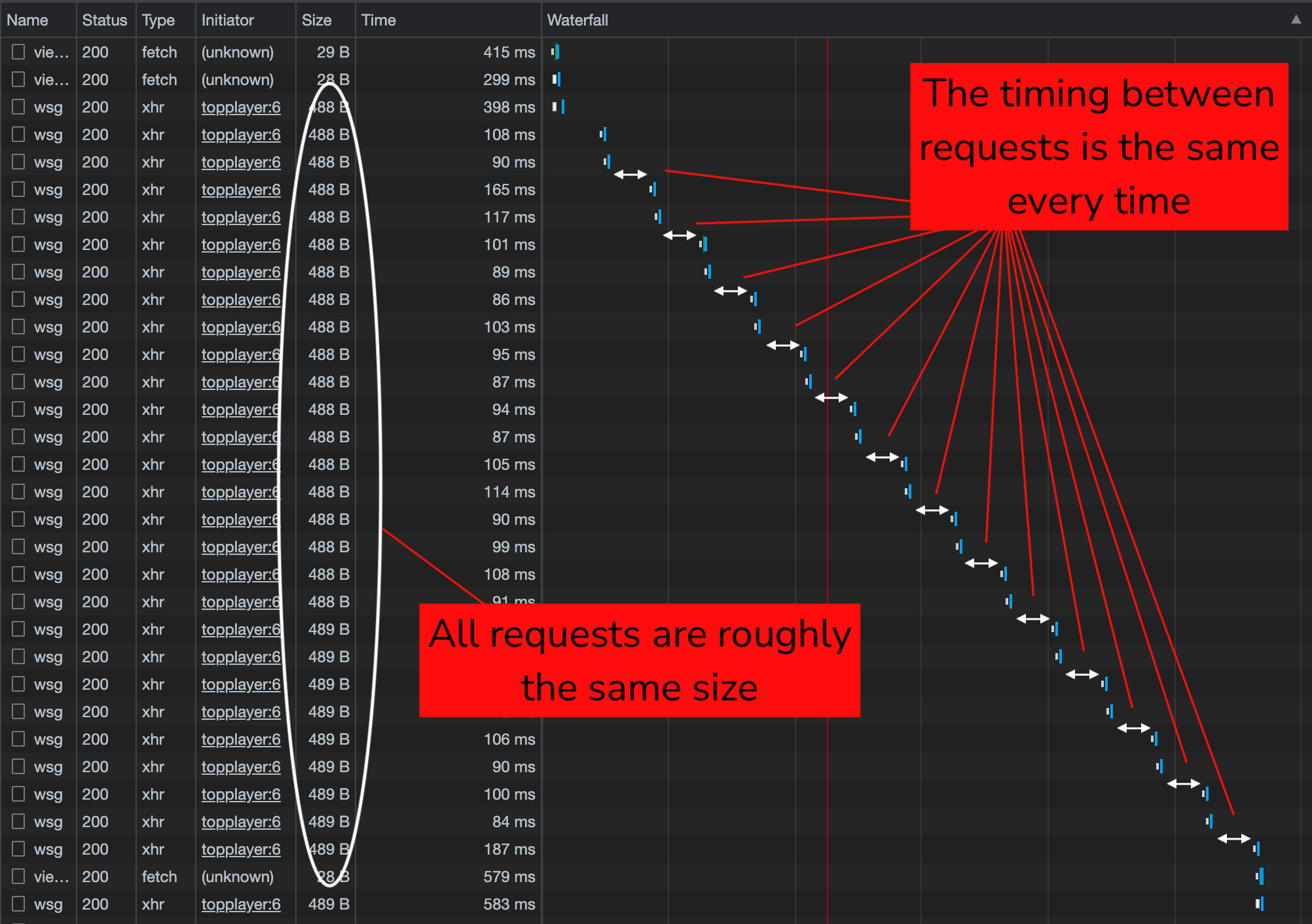
In this screenshot, I have filtered Chrome’s “Network” tab to only show a certain request (named “wsg”). If you look at the “Waterfall” chart, you can see that these requests are all around 488 bytes and appear to come in pairs at a regular interval. This is most certainly within the definition of “beacon” behavior, but in this case we aren’t looking at a malicious beacon. It’s important to be mindful of benign beacons when you’re hunting for malicious ones.
Threat hunters often seek to identify beacon activity to find malware and compromised hosts on their networks. On the surface, this seems like a relatively straightforward task, but the reality is that there are problems that get in our way, including:
Despite these challenges, there are a few techniques we can use to detect beacon activity. We may cover some of these in depth in future articles in this series:
It’s important to remember that beacons can manifest themselves across many different protocols and can often be visible in logging at different layers in the OSI networking model. For example, a piece of malware may use DNS beaconing to look for new commands from its C2 server. These beacons would be visible in DNS logs and also in connection logs. If an application used long-lived TLS connections for beaconing, you may not see the beacons in connection logs but you might see them in traffic logged during TLS/SSL inspection.
Beacons can be benign or they can be malicious, which makes them so difficult to deal with. Being able to reliably identify beacon activity is a good way to better understand your network and to help you zero in on communications and network activity that may be of interest.
Mar 11th, 2023
thehackernews.com

Mar 10th, 2023
www.darkreading.com

Mar 10th, 2023
grahamcluley.com

Mar 10th, 2023
www.bleepingcomputer.com

Mar 10th, 2023
thehackernews.com